


The journey to your child’s 11+ exam starts here, and we’re here to guide you every step of the way. First things first—let’s get that 11+ exam registration form filled out! It might seem daunting, but with our easy-to-follow guide, you’ll have it done in no time. Plus, there are multiple places to register, but the easiest way is through the West Midlands Partnership site.
So, let’s dive in and make this process as smooth and exciting as possible!
Why Registering Early is Key
Registering for the 11+ exam is the first official step on your child’s path to grammar school. The earlier you get this done, the more time you have to prepare and the less stressful the whole process will be. Trust us, you’ll feel a huge sense of accomplishment once this is checked off your list!
Step 1: Gather Your Information
Before you start filling out the form, make sure you have all the necessary information on hand. You’ll need:
- Your child’s full name and date of birth
- Current school details
- Your contact information
- A photo of your child on a plain background
- Any specific educational needs or accommodations your child may require
Having all this information ready will make the process quicker and easier.
Step 2: Visit the West Midlands Partnership Site
Head over to the West Midlands Partnership registration site. This is the most straightforward place to register for the 11+ exam. The site is user-friendly and guides you through each step of the registration process.
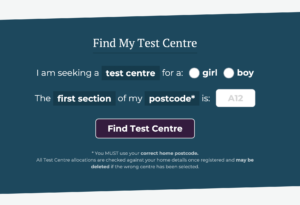
Begin by entering your current postcode (if you move during the process, you will need to update this with the admissions office), and the gender of your child.
Once you have done this, click the ‘Find Test Centre’ button.
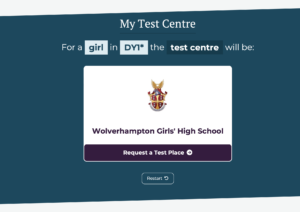
You will be directed to your nearest test centre – which will be different for each person who applies. Here you will need to select the test centre to begin your application.
Step 3: Create an Account
Next, you will need to create an account on the West Midlands Partnership site. This will allow you to save your progress and come back to it if needed.
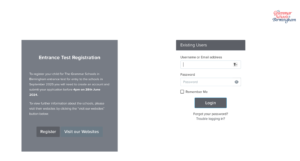
Click the register button to get started!
Step 4: Fill in the Application Form
Now, it’s time to fill in the form! Here’s how to tackle it section by section:
Parent Details
- Parent’s Full Name and Title: Ensure these are entered exactly as they appear on official documents.
- Current Address
- Your Contact Details: Double-check that your email address and phone number are correct, as this is how you’ll receive important updates.
- Create a Password: This needs to be at least 8 characters long, with number characters, and lower and upper case characters.
Once you have completed and submitted this form, within a few minutes you will receive an email. This email will ask you to click a link to set-up your child’s application to Grammar School.
Step 5: Click the link.
Click the link that comes through via email. Make sure to double-check that this is from The Grammar Schools in Birmingham and is not a scam email. Once you have done this, you will be sent to your West Midlands Partnership Account to fill in your application form.
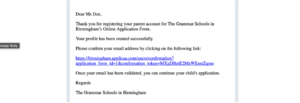
Once you have clicked this button, you will be sent to your account on the West Midlands Partnership Website. Click ‘Start New Application’ to get started.
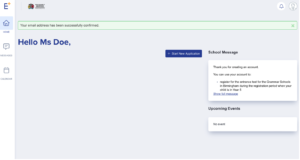
Step 6: Fill in the 11+ Exam Registration Form.
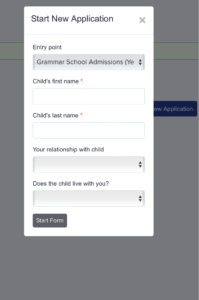 Once you click the button you will need to enter your child’s details.
Please ensure these details match their identification documents. Including their full name, even if they go by a nickname.
Once you have filled in these brief details, you will be sent to the main application page. This contains segments to fill in. Click the ‘Save and Next’ button every time you move onto a new segment. Once you have started the application, you can leave this midway through and return to the application later.
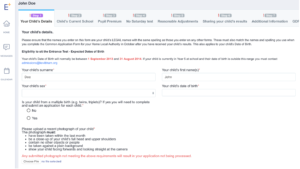
Fill in each section carefully. Don’t forget to read all the information before moving on.
It’s really important – if you are looking to apply your child’s results to all 19 schools within the West Midlands partnership – that you tick the ‘share results’ button on page 6.

Once you have finished all the sections on the application form. Make sure to click the ‘Save and Submit’ button on the final screen.
Once registered, mark all relevant dates in your calendar:
- Exam Date: Note the exam date and any preparatory deadlines.
- Notification Dates: Keep an eye out for when you’ll receive your child’s exam results and any other communications.
You did it! Completing the registration is a big milestone, so take a moment to celebrate this achievement with your child. It’s one step closer to their exciting future.
Final Tips
- Keep Copies: Save or print copies of the 11+ exam registration form and confirmation email for your records.
- Stay Informed: Regularly check your email and the West Midlands Partnership site for updates.
- Prepare Together: Use the time leading up to the exam to support your child with study schedules, practice tests, and relaxation techniques.
We’re here to support you and your child through this journey. By following these steps, you’ve set a solid foundation for a successful 11+ exam experience.
Happy registering, and here’s to a bright future ahead!


